Skip to Store Area:

Electronic Kits, Electronic Hobby Kits, Educational Electronic Kit

Electronic Kits

Netduino

More Views

Netduino

Email to a Friend

Be the first to review this product

Bookmark and Share

Availability: In stock.

$34.95
Add Items to Cart Add to Cart

Quick Overview

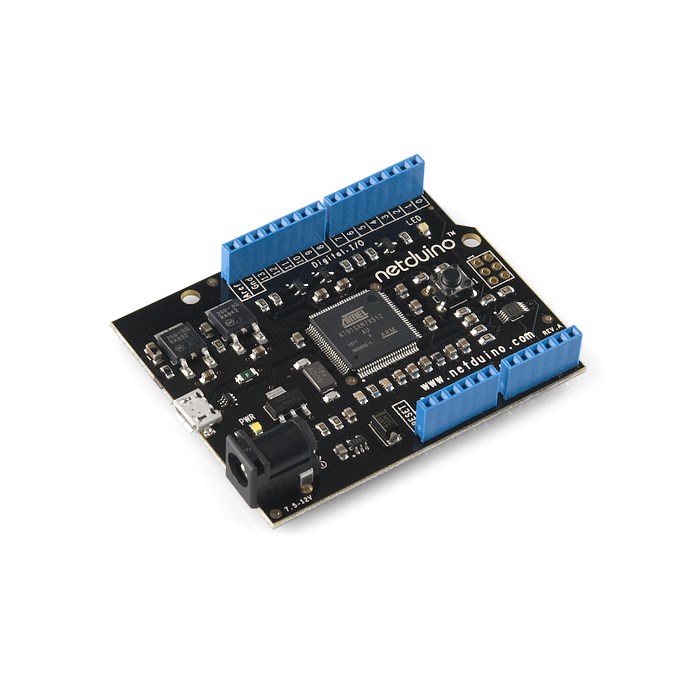
Atmel 32-bit microcontroller
Speed: 48MHz, ARM7
Code Storage: 128 KB
RAM: 60 KB
20 GPIOs
SPI
I2C
2 UARTs (1 RTS/CTS)
4 PWM
6 ADC channels
Supply voltage: 7.5 - 12.0 VDC or USB powered
Output voltage: 5 VDC and 3.3 VDC regulated
Digital I/O are 3.3 V -- but 5 V tolerant


Netduino is a new open source electronics platform based on the Microsoft .NET Micro Framework.

It features a very powerful 32-bit microcontroller integrated with a rich standard development environment which is freely available through Microsoft (Visual Studio 2010).

The platform allows for easy interfacing with switches, sensors, LEDs, serial devices, and more. The Netduino combines 20 GPIOs with SPI, I2C, 2 UARTs (1 RTS/CTS), 4 PWM and 6 ADC channels.

The Microsoft .NET Micro Framework combines the ease of a high-level programming language (C#) with the features of microcontrollers.

Enjoy event-based programming, multi-threading, line-by-line debugging, breakpoints and more!

3rd-party accessories offer pre-built functionality like GPS location, servo control and battery power.

Netduino is also pin compatible with Arduino shields. Drivers are required for some Arduino shields.

See the Netduino Getting Started Guide for more information on how to get started with the Netduino.

System Requirements

Windows

● Windows XP, Vista, or 7 (32 or 64 bit)
● 1.6 GHz or faster processor
● 1 GB RAM
● Up to 3 GB of available hard drive space for Visual Studio Express 2010

Mac OS and Linux

● Parallels
Both USB and Serial deployment supported
Requires copy of Windows in virtual machine
● VMWare Fusion or Oracle VirtualBox
Serial deployment supported
Requires copy of Windows in virtual machine
● Experimental Mono (native) support
Future native Mac OS and Linux support provided by an experimental open source project
Add Your Tags:
Add Tags
Use spaces to separate tags. Use single quotes (') for phrases.